Free PDF text editor · No signup
Edit existing PDF text online
Correct a name, date or sentence directly in your PDF. Click existing text, type your replacement, then apply and download your edits. Opening the file keeps its original page layout; Word conversion is available as a separate export.
Free to use · No account required · Temporary server processing
Edit your PDF, right on the page
Click its existing words and start typing. Change fonts, move text and add new text while the original page stays in place.
Free · No signup · Up to 25 MB / 100 pages
Temporary server processing. Sessions expire after two hours.
Upload your PDF, then click its words to edit directly on the page.
Try it yourself · Fictional document
Edit existing PDF text: before and after
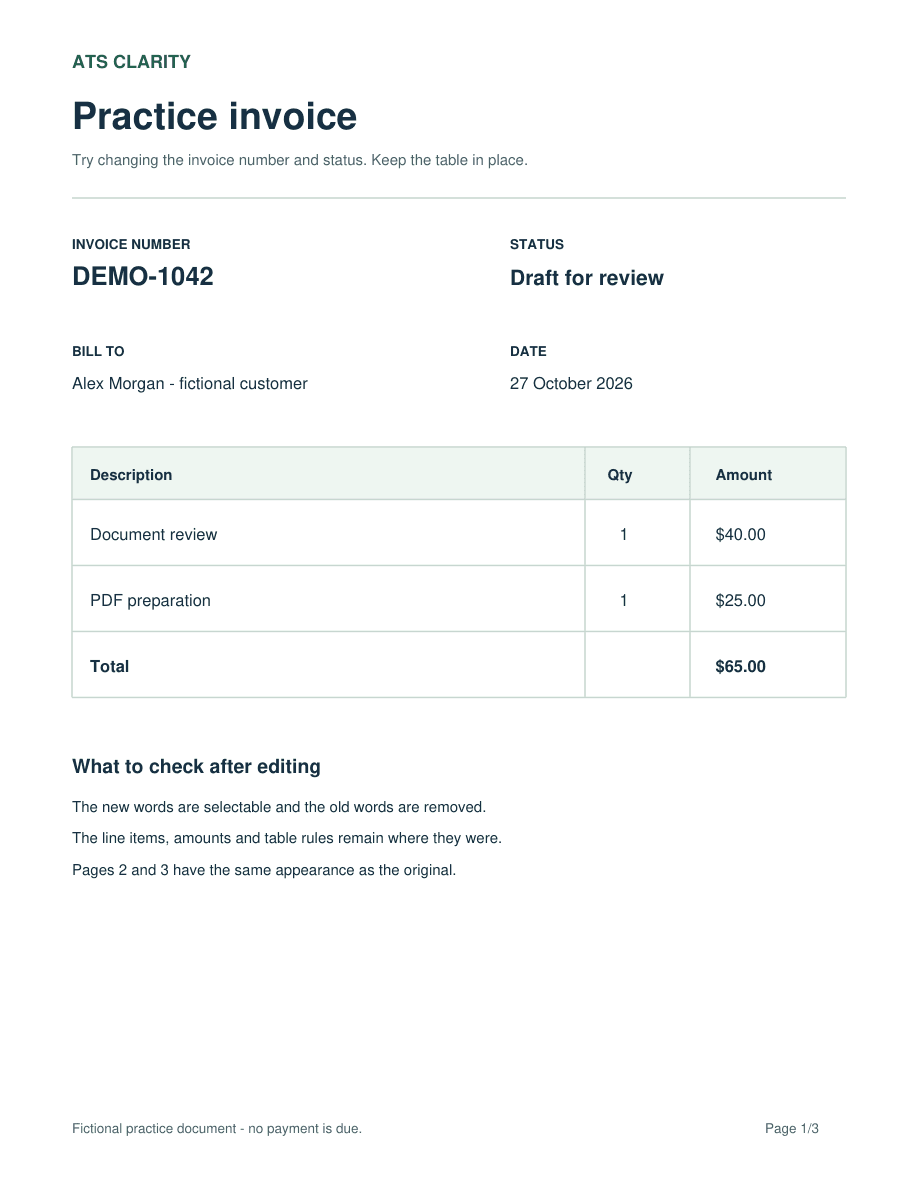
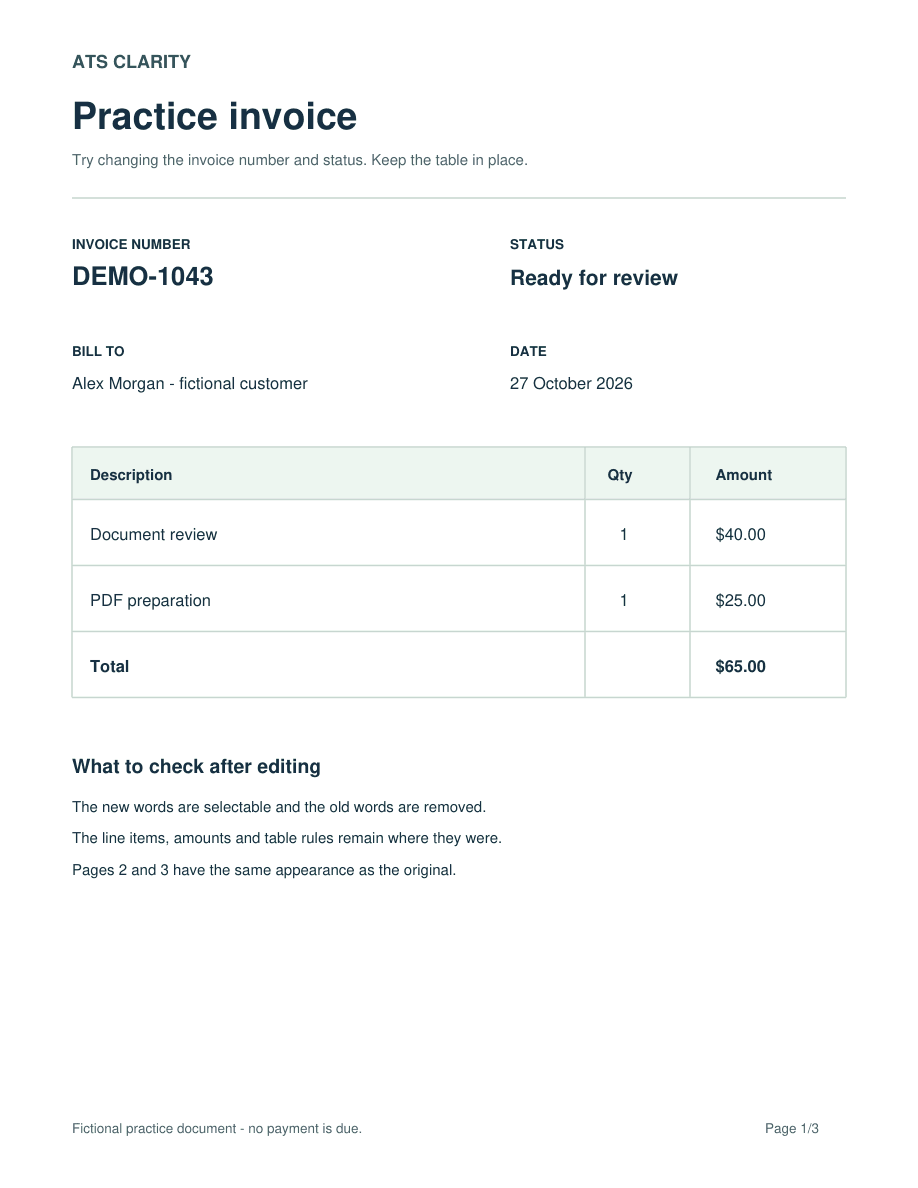
We changed an invoice number and status using the same editing engine as this tool. The table amounts stay intact, and the saved PDF contains the replacement words as selectable text.
| Original text | Edited text |
|---|---|
| DEMO-1042 | DEMO-1043 |
| Draft for review | Ready for review |
 Download the original PDF
 Download the edited PDF
Checked October 27, 2026: at 72 pixels per inch, page appearance outside the two edited value rows matched the original across all three pages. This is a check of this example; review your own document after editing, especially longer text or replacement fonts.
Choose Try a sample PDF in the editor to repeat the exercise, or follow the step-by-step PDF text editing guide. No account or payment card is required.
Up to 25 MB and 100 pages. Editing sessions expire after two hours; expired files are removed during cleanup.
Select Text and type directly on existing words. Use the floating font, bold, italic, size and color controls. Click blank page space to add text or use a text box's drag handle to move it. Opening preserves the original layout.
Clicking another text box keeps staged edits. Choose Apply changes, then Download; edits do not survive a refresh. Word conversion reconstructs paragraphs, images and tables and may need correction. Image-only scans need OCR; overlapping or rotated text is preserved without direct editing.
How to use PDF Text Editor Online — Edit Existing Text
- Choose Upload PDF file, or Try a sample PDF with fictional details. Opening the PDF preserves its original page layout.
- With Text selected, click existing words and type directly on the page. Use the floating toolbar for font, bold, italic, size and color. Press Enter for a new line.
- Click another text box to continue editing; your previous changes stay staged. Click a blank part of the page to add text, or use a text box's drag handle to move it. Use Undo or Redo to revise your work.
- Choose Apply changes to prepare the edited PDF, then Download. Convert PDF to Word is a separate export of the current document.
When to use it
Correct a name, update a date, revise wording, or add a note to a text-based PDF. Use Word conversion when you need to continue working on paragraphs and detected tables in Microsoft Word.
What you get
An edited PDF, or a DOCX file reconstructed from the current PDF. Word conversion rebuilds detected paragraphs, images, and tables; it does not guarantee an identical layout.
Limits and things to check
PDF input is limited to 25 MB and 100 pages. Text edits stay in the current editor until you apply and download them; they do not survive a refresh or opening another file. Editing sessions expire after two hours and expired files are removed during cleanup. Image-only scans require OCR; overlapping or rotated text is preserved without direct editing. New characters can require a matching fallback font. Longer or moved text can overlap nearby content, so review the page before sharing it.
This editor uploads the PDF for temporary document processing. Sessions expire after two hours, and files are removed during automatic cleanup. Read our privacy policy.
Common questions
How do I change existing PDF text instead of typing over it?
Upload the file, select Text and click existing words. Type directly at that position on the page. The floating toolbar changes the font and formatting. When you choose Apply changes, the saved PDF removes the selected original text and inserts your replacement rather than hiding the old words behind a white box.
Will opening the PDF move its text or tables?
Opening displays the original PDF without reconstructing its page. Your edits change the text objects you select or add; other objects stay in place. Longer text does not reflow the surrounding page automatically. Check spacing and any replacement font before downloading.
Can I edit several text boxes before saving?
Yes. Click another text box after typing to keep the previous change and continue editing. You can add text by clicking a blank area, move it with its drag handle, and use Undo or Redo. Choose Apply changes, then Download to save the result. Staged edits do not survive refreshing the page or opening another PDF.
Will PDF to Word keep every table and page exactly the same?
The converter reconstructs detected tables, images, and paragraphs. Check every page in Word, especially merged cells, complex columns, custom fonts, and scanned content. A PDF describes page placement differently from a Word document, so some layout changes can remain.
Does this editor upload my PDF?
Yes. This editor uses temporary server processing, unlike the browser-based tools below. Editing sessions expire after two hours and stored files are removed during automatic cleanup. No account is needed.
Useful next steps
How to edit existing PDF text
Follow the steps to activate text editing and troubleshoot the document editor.
Convert PDF to Word with tables
Understand reconstruction, check the result, and handle complex PDF layouts.
Organize PDF — Reorder Pages Online
Reorder PDF pages with a custom sequence, reverse ranges, or repeat pages. Free browser PDF organizer with no upload or signup; up to 200 source pages.
PDF to Text Converter Online
Extract embedded text from a PDF and download a TXT file in your browser. Free, no upload or account; scanned images require a separate OCR workflow.